Step 1 — Load Accounts
Open the File menu and click Load accounts from file or clipboard.
- Formats supported:
username:passwordone account per line.
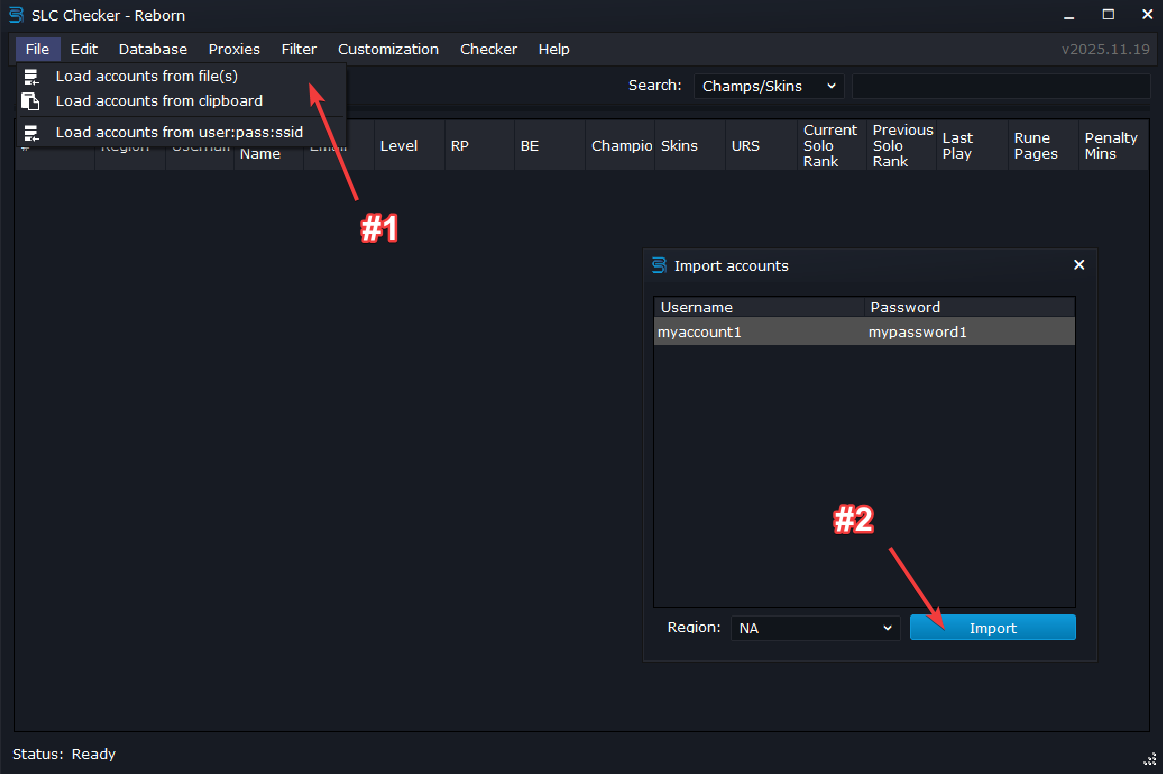 File → Load accounts from file or clipboard → Preview the accounts → Click "Import"
Step 2 — Load Proxies
Go to the Proxies menu and click Configuration. Add HTTP/S or Socks4/5 proxies.
- Formats:
host:portorhost:port:username:password - Prefer residential or ISP proxies for best results
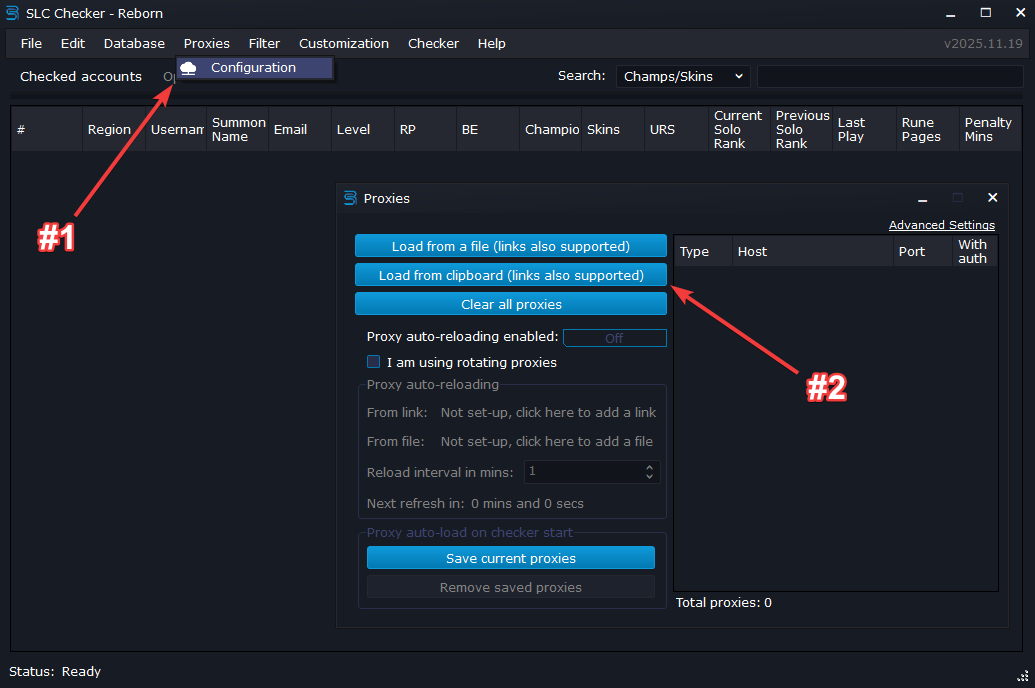 Proxies → Configuration → Load proxies from file or clipboard → Preview the proxies → Click "Import"
Step 3 — Set Captcha Solver
Open Checker → Settings → Set captcha service. Choose your provider and paste the API key.
- Supports multiple providers; select the one you use
- Click Set and validate to verify the key works before continuing
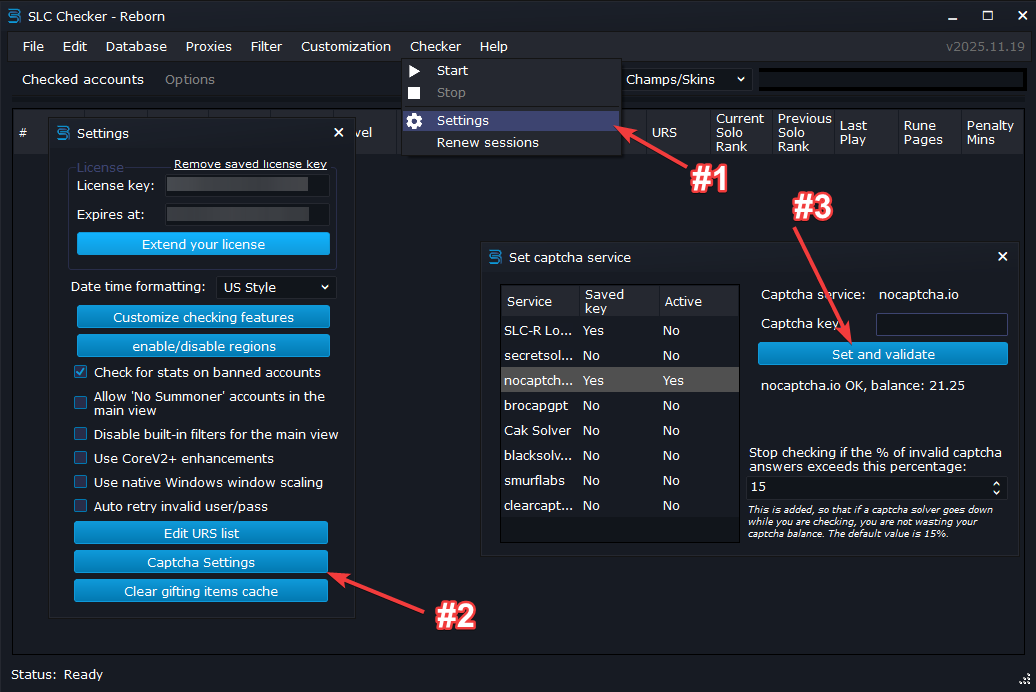 Checker → Settings → Set captcha service → Provider selection and API key
Step 4 — Start Checking
From the Options tab, select the desired workers count (use 10-15 at the start if you are unsure), then press go to Checker → Start.
- Rechecks skip captcha when sessions are cached
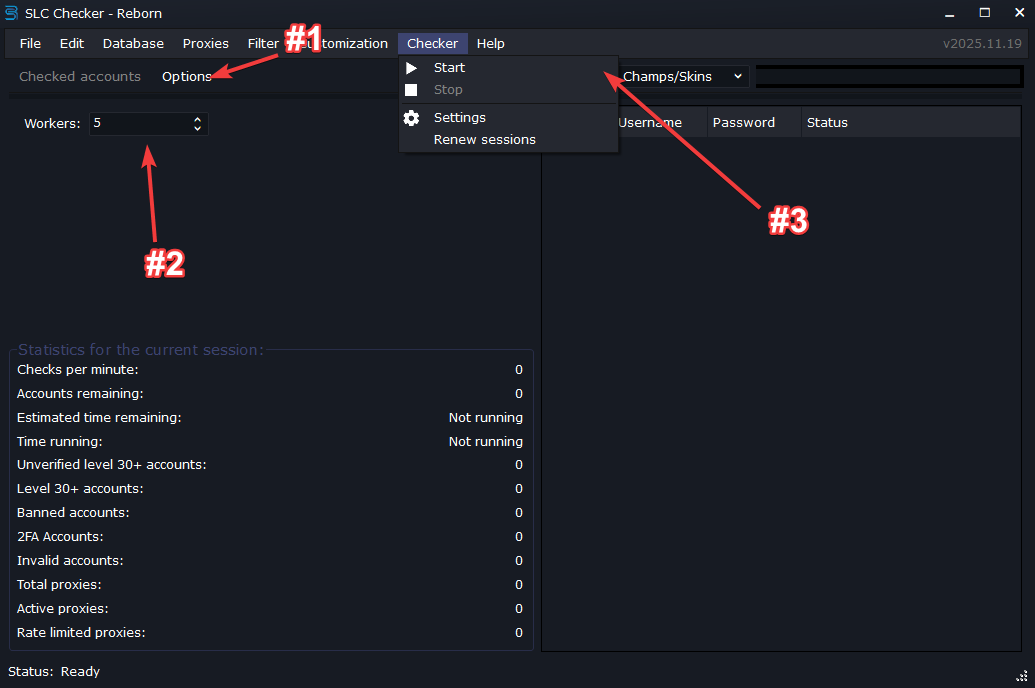 Checker - live progress
Step 5 — Import / Export Accounts to SLC-R Database
Use the integrated database to save your accounts and to later load them back into the program. You can also export the accounts to various other formats such as JSON, CSV, custom text files.
- Database → Export database: Export the current accounts to a SLC-R database file.
- Database → Load database: Import accounts from a SLC-R database file
- Other options: Right click on the main view → Export → All or selected only → Choose the format you want to export to (JSON, CSV, custom text files)
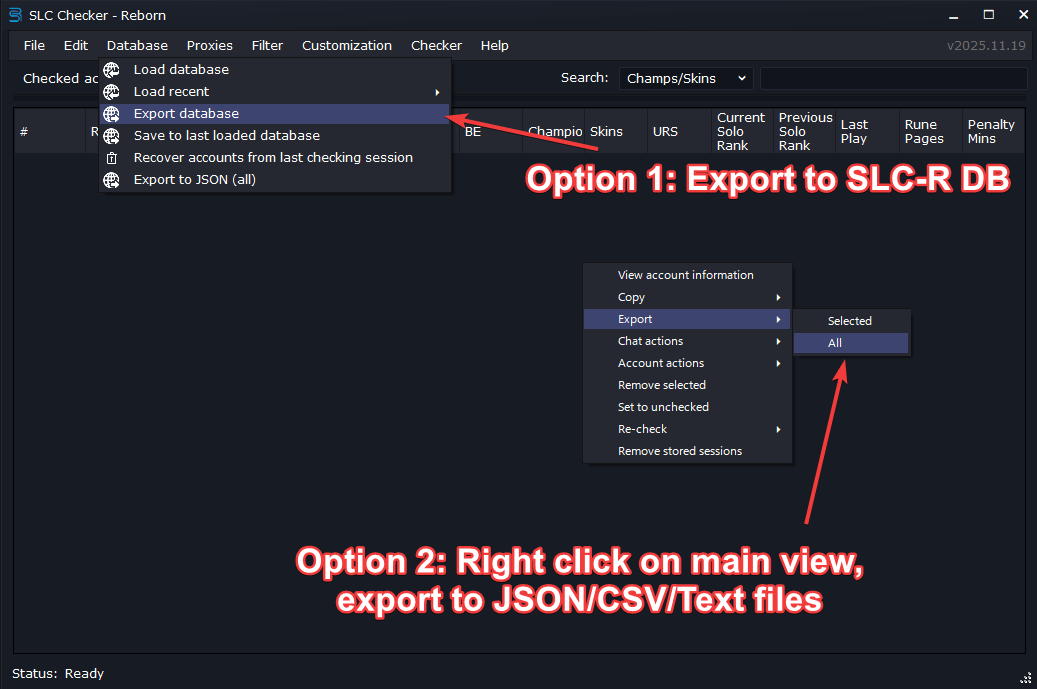 Database - various import/export options
Features
SLC Checker Reborn is an AIO tool for managing League of Legends accounts It can check and capture the contents of your accounts with ease
Account Capture Details
- Summoner name
- Email status verified or not
- Phone status verified or not
- Riot Points
- Blue Essence
- Level
- Rank current and previous for Solo Flex and TFT
- Ranked games this season Solo Flex and TFT
- Win rate this season Solo and Flex
- Last game date
- Last active date
- Ban reason if banned and banned until
- Queue penalty in minutes
- Number of rune pages
- Refundable RP and BE balance
- Remaining refunds
- Username change required
- Summoner name change required
- Account creation date and country
- Original region if transferred
- Password changed last at
- Honor level and checkpoint
- Email address censored with recovery function for verified accounts
Content Capture
- Champions with purchase dates
- Skins with purchase dates and rarity mythic ultimate legendary etc
- Chromas with purchase dates and rarity
- Ward skins with purchase dates and rarity
- Emotes with purchase dates and rarity
- TFT Little Legends with purchase dates and rarity
- TFT maps and booms with purchase dates and rarity
- Loot items including shards chests keys capsules prime capsule etc
Export and Data Tools
- Copy accounts to clipboard with any format combo user pass opgg champions skins etc
- Export to database to load later
- Export to text with custom formatting
- Export to JSON
- Filtering skins by URS ultra rare skins list such as Black Alistar PAX TF PAX Sivir Rusty Blitzcrank etc
- Create account filters for any field
- Fully customizable grid view
- Crash recovery system saves progress after power loss or crash
Actions and Automation
- Chat actions remove friends add friend remove random friend
- Account actions change password change username change email
- Summoner name changes including banned accounts
- Game actions transfer region refund RP or BE send gifts buy items view friend list view store history
- Hextech crafting craft keys open chests and capsules disenchant shards and permanents
- Gifting from banned accounts
- Developer CLI support for automated processing
Proxy Support
- HTTP Socks4 Socks5 rotating sticky or per request auth support connection limit control
Requirements
- Windows 7 and higher 64 bit only
- NET 7 required
Exports
SLC Checker Reborn gathers and exports the following fields and collections
Fields
- {{index}}
- {{username}}
- {{password}}
- {{regionname}}
- {{accountid}}
- {{friendlystatus}}
- {{summonername}}
- {{riotid}}
- {{emailverificationstatus}}
- {{riotpoints}}
- {{blueessence}}
- {{orangeessence}}
- {{mythicessence}}
- {{championscount}}
- {{skinscount}}
- {{urscount}}
- {{chromacount}}
- {{iconscount}}
- {{wardskinscount}}
- {{emotescount}}
- {{tftlittlelegendscount}}
- {{tftmapskinscount}}
- {{tftboomscount}}
- {{rpsum}}
- {{rpsumwithprime}}
- {{lootitemscount}}
- {{primecapsulecount}}
- {{currentsolorank}}
- {{previousranksolo}}
- {{rankedgamesplayedsolo}}
- {{winratesolo}}
- {{rankedgamesplayedflex}}
- {{winrateflex}}
- {{rankedgamesplayedtft}}
- {{currentranktft}}
- {{currentrankflex}}
- {{previousrankflex}}
- {{previousranktft}}
- {{checkedat}}
- {{lastactive}}
- {{banneduntil}}
- {{birthdate}}
- {{banreason}}
- {{lastgamedate}}
- {{runepages}}
- {{summonerid}}
- {{penaltymins}}
- {{remainingrefunds}}
- {{refundablerp}}
- {{refundablebe}}
- {{emailaddress}}
- {{level}}
- {{puuid}}
- {{needsusernamechange}}
- {{accountcreationcountry}}
- {{needssummonernamechange}}
- {{agerestricted}}
- {{needsriotclientupdate}}
- {{originalaccountregion}}
- {{accountcreatedat}}
- {{passwordchangedat}}
- {{phoneverified}}
- {{honorlevel}}
- {{honorcheckpoint}}
- {{xboxgamepass}}
- {{primecapsuleclaimedat}}
- {{primecapsuleopenedat}}
- {{rankedrestrictiongamesremaining}}
- {{chatrestricteduntil}}
- {{age}}
Collections
- Enumerable {{#champions}} available props friendlydata.rarity friendlydata.name points masterylevel obtainedat
- Enumerable {{#skins}} available props friendlydata.isurs friendlydata.legacy friendlydata.ischroma friendlydata.israre friendlydata.isepic friendlydata.islegendary friendlydata.ismythic friendlydata.isultimate friendlydata.name friendlydata.rarity border obtainedat
- Enumerable {{#summonericons}} available props friendlydata.israre friendlydata.isepic friendlydata.islegendary friendlydata.ismythic friendlydata.isultimate friendlydata.name friendlydata.rarity obtainedat
- Enumerable {{#wardskins}} available props friendlydata.israre friendlydata.isepic friendlydata.islegendary friendlydata.ismythic friendlydata.isultimate friendlydata.name friendlydata.rarity obtainedat
- Enumerable {{#emotes}} available props friendlydata.name friendlydata.rarity obtainedat
- Enumerable {{#tftlittlelegends}} available props friendlydata.israre friendlydata.isepic friendlydata.islegendary friendlydata.ismythic friendlydata.isultimate friendlydata.name friendlydata.rarity obtainedat
- Enumerable {{#tftmapskins}} available props friendlydata.rarity friendlydata.name obtainedat
- Enumerable {{#tftbooms}} available props friendlydata.israre friendlydata.isepic friendlydata.islegendary friendlydata.ismythic friendlydata.isultimate friendlydata.name friendlydata.rarity obtainedat
- Enumerable {{#lootitems}} available props quantity friendlydata.name friendlydata.type friendlydata.isskinshard friendlydata.rarity
- Enumerable {{#chromas}} available props friendlydata.isurs friendlydata.legacy friendlydata.ischroma friendlydata.israre friendlydata.isepic friendlydata.islegendary friendlydata.ismythic friendlydata.isultimate friendlydata.name friendlydata.rarity border obtainedat
Recommended Resedential Proxys
You must use resedential proxys Datacenter proxys will be blocked by Riot
Recommended Captcha Provider
- #1 Register an account @ NOCAPTCHA.IO, Verify your email, Sign in
- #2 Visit NOCAPTCHA.IO's riot terms. Accept the agreement.
- #3 Visit your accounts user control panel, copy your accounts DEV ID, and API KEY
- #4 Load funds into the site (I believe they require you to use at least 6000 credits per day to maintain access)
- #5 Visit SLC-R, go to CHECKER > SETTINGS > CAPTCHA SETTINGS > CLICK NOCAPTCHA
- #6 Fill in your DEVID & APIKEY in format DEVID:APIKEY
- #7 If you see your accounts balance it worked!
- TIP: Your proxys must contain a COUNTRY CODE in either the username or password! proxys must be sticky!
NET 7.0 is required


You are Ready
If you need help with anything else or if you have any questions, join our discord server here.